Families · Small teams

Share lists, reminders, and files with your people, in a private space you own.

A bar crew working through the closing checklist. A family on one grocery list while staying at a vacation rental. Shared vacation photos in a centrally located secure location for all to enjoy.

All done the same way: Same Portico underneath: your agent holds the lists and files, and you invite the people who should see them. And there are many more applications for Portico.

Here are a few of the many ways Portico can be used. Pick one in Ways to use Portico below and follow along, screen by screen.

The design

Three pieces, one doorway

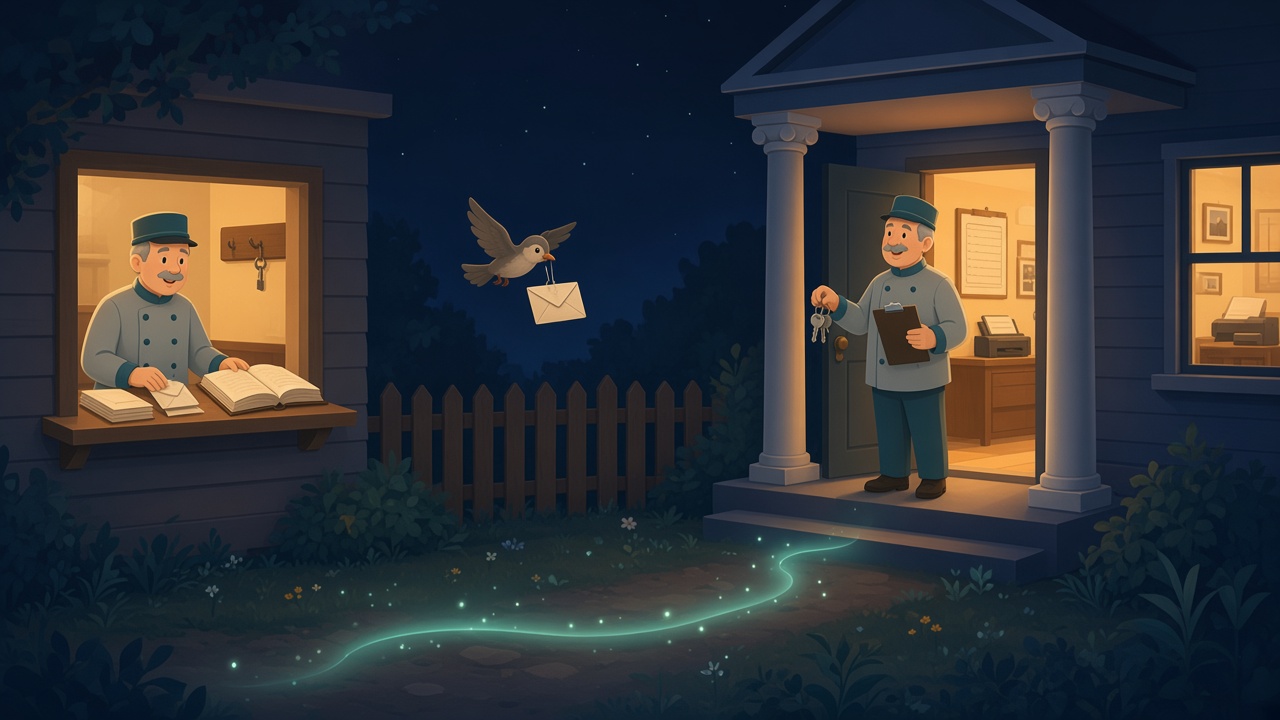
Out on the open internet, Portico Server is the post office: it keeps accounts, records who you've invited, and delivers the invitations. On your side of the door, your agent is the concierge: it holds the keys, keeps what your people share, and checks every guest against your list. Between them is the portico: the one door guests come through, where your agent checks each invitation before showing anyone what you shared.

On the left, a postal clerk sorts envelopes in a small post office. On the right, across a fence, a concierge holds the house keys at a porch with two columns. A bird carries one envelope between them.
The post office delivers the invitation. The concierge holds the keys.
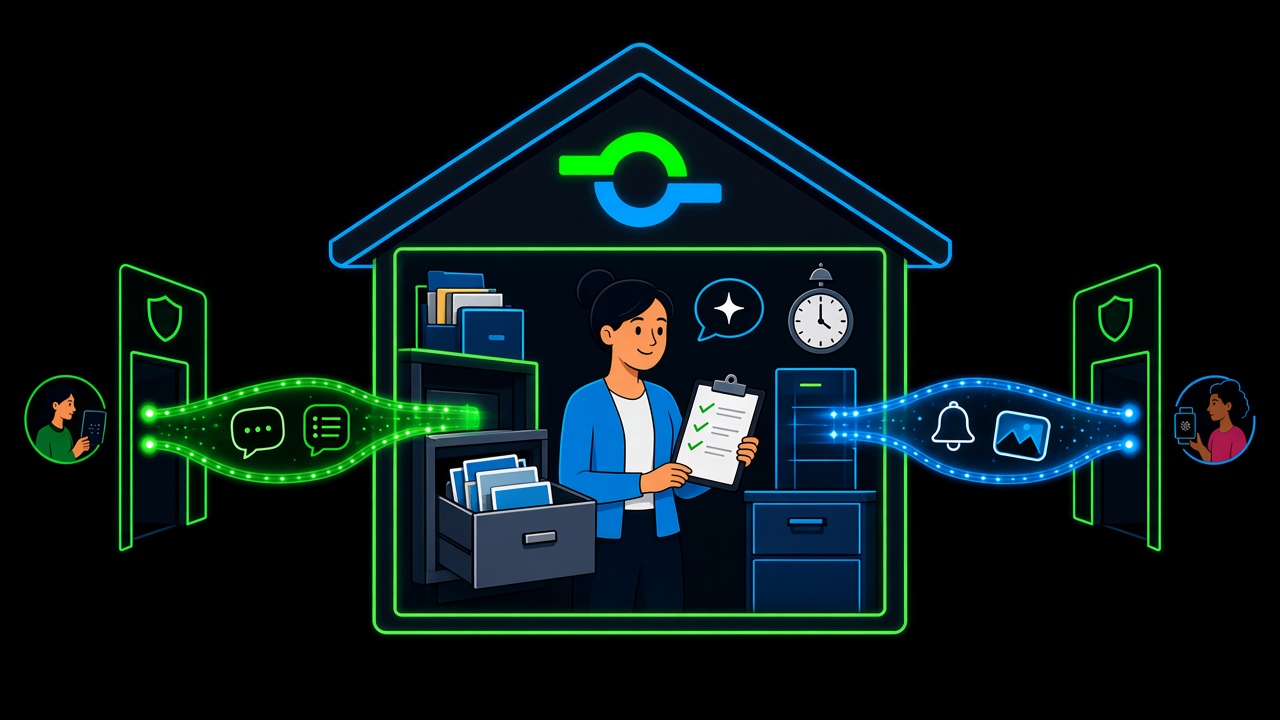
Inside a Portico house, the agent holds a checklist beside a filing cabinet of folders and photos, a reminder clock, and an AI chat bubble, while private paths from family members' phones arrive through shielded doors.
Behind the door, your agent keeps the lists, photos, and reminders.

Your agent

The concierge

It keeps the grocery list, the chore checklist, the family thread, and the photo folders. It sends the reminders and answers AI Chat from facts kept on the agent — a note about one person, a note for one conversation, or a fact the whole household shares. It hands each person only what you invited them to see.

Cloud Agent — hosted for you, no hardware to buy. Edge Agent — the same Portico on a computer in your home.

In the cloud

The post office

Portico Server handles sign-in, accounts, and invitations. It knows an invitation exists; it does not know what is behind the door. Your lists, messages, and files are never kept there.

For guests

The portico

Your agent checks each guest against the list and opens a private path from their phone straight to what you shared — nothing else. Remote family connects through Portico Relay. Your router stays closed.

The full picture: how Portico works →

Ways to use Portico

Pick a story, then do it yourself

Each one walks you through the real app with screenshots, from an empty agent to people sharing, getting reminders, and checking things off.

Illustrative stories

Four families, four stages

These stories, and the people and businesses in the journeys above, are fictional illustrations of how Portico is designed to work. They are not quotes from real customers yet.

Lists · Grocery

The Okonkwo family — "It finally stopped being my job alone."

We kept three different grocery lists going — mine on paper, my husband's in his phone notes, the kids texting "can someone get milk?" into the group chat. Someone always bought the wrong thing or bought it twice.

Now there is one list on the iPad in the kitchen. Amara adds snacks from her phone on the bus. I add dinner ingredients from work. When my mother visits from Lagos, she is on the same list — invited, not copied into some app that owns our shopping history.

I asked our son where the list actually lives. He said, "On our agent — the little computer in the closet." The cloud just knows we are allowed to see it. That is the part I care about. The list is ours. It sits at home like the spice rack.

Fictional · Cloud Agent → Edge Agent Emphasis: shared list, then the agent moved home

Conversation

The Reyes family — "Our group chat is not a product."

Our daughter moved three states away for her first job. We did not want every family message sitting in a free app that reads metadata, changes features, or shows her ads between photos of the dog.

Conversation runs on our Edge Agent — same box that handles the grocery list. Elena texts from her apartment. We reply from the kitchen. My partner uses the browser when his phone is charging. It feels like texting. Underneath, it is our thread on our hardware.

Portico Server in the cloud is the post office. It knows Elena is invited and delivered her invitation. When she opens the app, our agent checks her against our guest list and lets her in. The messages do not live in Virginia in someone else's database. They live in the hallway between us — the portico — and we decide who walks through.

Fictional · Edge Agent + Portico Mobile Emphasis: private family messaging, cloud coordinates only

AI Chat

The Lindstrom family — "Ask the house, not the internet."

We use AI Chat for meal planning, homework questions, and "explain this bill in plain English." I did not want every prompt about our finances or the kids' schoolwork uploaded to a public model farm forever.

Our Edge Agent runs the chat, and it remembers in three places. I told it I am allergic to shellfish. That fact is mine: it shows up when I ask, and it stays out when my spouse asks what is for dinner. The meal-planning thread knows we are vegetarian through October. That fact belongs to the thread, not to every chat in the house. "The dog is Biscuit" is a household fact. It is there in every reply, and only I can save or delete those, so a guest on the list cannot rewrite what the house knows.

Nothing is written until one of us taps save. The cloud server never holds our transcripts or those facts. It coordinates who may reach the agent. If we point the chat at a different model, the memory stays on the agent. We are choosing where the conversation is kept, and who each fact is for.

Fictional · Edge Agent · AI Chat Emphasis: memory for one person, one chat, or the whole household

Cloud Agent → Edge Agent → Home Agent

Denise Marsh — "I did not set out to run a data center."

I am a school office manager, not an IT person. When my sister showed me Portico, I wanted the grocery list and nothing that involved opening ports on my router. I clicked through the Cloud Agent setup on a Tuesday night. Ten minutes later my teenagers were adding cereal to a list I could see on my phone at work. Portico Server handled the accounts. Our stuff was already on an agent — just not in my house yet.

Six months in, I wanted Conversation and a backup I could point to. My nephew installed an Edge Agent on an old Mac mini in the laundry room. He said one sentence I remember: "The cloud still coordinates; the box just moved home." Same login. Same invites for the kids. Lists and messages now live on that mini. I did not become a sysadmin. I learned where to click when the app says the agent is healthy.

Now I am working toward a Home Agent — a proper cluster for more apps, with a friend who runs homelab stuff helping on a Saturday. I still will not read Kubernetes docs for fun. I do not have to. The path is the product: start without hardware, bring data home when you are ready, grow when someone you trust can help you over the hump. Each step kept the same portico — same invites, same family on their phones — only the room behind the door got bigger.

Fictional · Cloud → Edge → Home (in progress) Emphasis: non-technical on-ramp, gradual path to full home experience

Build your portico.

Start with a Cloud Agent we host for you. Move to an Edge Agent on a computer in your home when you are ready. Grow toward a Home Agent when you want more. Same account. Same invites. You decide where the data lives.